Imagine you go to a website to get a cleaning quote. The form asks: - Type of room? - Square footage? - Are there pets? - How many children are in the family?
You stop. "Why would they want to know about my kids? I'm not looking for a nanny!"
And leave.
This is a classic mistake: the form asks unnecessary questions . The result? High drop-off rates, frustrated users, and lost sales.
The good news: there's a solution. It's called logical branching (or conditional logic). And with FormDesigner , you can implement it in 5 minutes—without writing a single line of code.
What are logical branches?
It's a simple principle: show only those questions that are relevant to the user , based on their previous answers.
Example:
- If the client selected "Apartment renovation" → ask "Area of the premises".
- If you chose "Interior Design" → ask "Preferred Style".
- If you specified “Office” → show the “Number of employees” field.
The form becomes personalized , smart and respectful of the client’s time.
Why is it important not to ask unnecessary questions?
The psychology is simple: every irrelevant question is a cognitive load + loss of trust .
The numbers confirm:
- Forms with logical branches have a 30-50% higher conversion rate (HubSpot, Formisimo).
- 61% of users abandon a form if it seems “too long” (Baymard Institute).
- And according to Nielsen Norman Group, the best UX is the one that doesn't make you think .
When you don't ask too much, the client feels: "This company understands me."
And this is a direct path to sales.
Where are logical branches especially useful?
🔹 Quizzes for service selection
"Which course is right for you?" → By goal ("I want to earn money" / "develop"), → By experience ("beginner" / "already tried"), → By budget.
Result: personalized offer + high willingness to buy.
🔹 Online calculators
"Calculate cleaning costs" → If "apartment" → area, presence of pets. → If "office" → number of floors, cleaning schedule.
Accurate calculation = trust = application.
🔹 Questionnaires
"What's your staff size?" → If >50 people → show the "Integration with your CRM" block. → If you're a sole proprietor → offer a basic plan.
You speak the language of every segment.
🔹 NPS and feedback
Rating ≤6? → "What went wrong?" Rating ≥9? → "Can I use your review in advertising?"
High-quality data without junk.
How to set up logical branching in FormDesigner?
Everything is done visually - without a programmer:
- Create a form (for example, “Service Selection”).
- Add a trigger field : drop-down list, radio buttons or checkboxes.
- Add a fieldX that should appear conditionally .
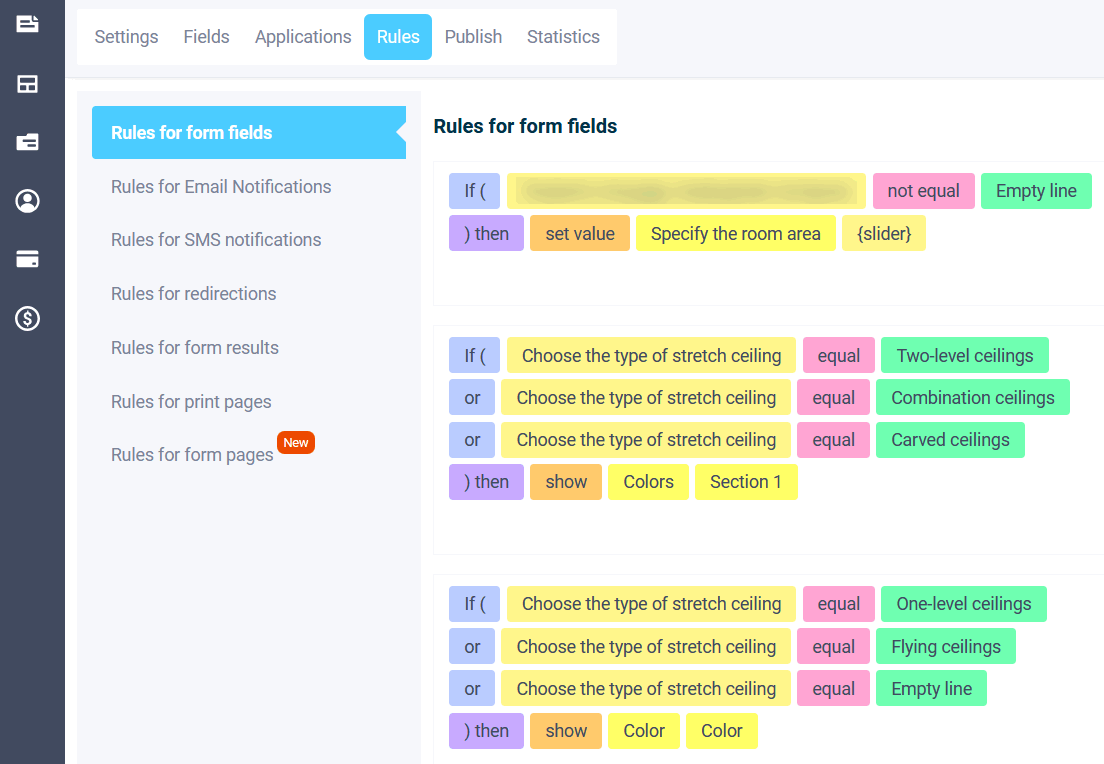
- In the "Logic" tab - Rules for form fields.
- Specify: if [field] = [value], then show fieldX.
- Save and be sure to test .
💡 FormDesigner supports complex logic : - "If A AND B" - "If X OR Y" - Multiple conditions for a single field. The Logic section includes rules for page navigation, rules for form results, rules for redirects, and more.
Best design practices
- Start with a key separator question : “What is your goal?”, “Who is the service for?”, “Budget before/after 10,000 ₽?”
- Don't go more than 2-3 levels deep , otherwise the user will get confused.
- Add a progress bar : "Step 2 of 4" reduces anxiety.
- Use clear language rather than technical terms.
- Test on real people - what is obvious to you may not be clear to the client.
What to avoid
| Error | Consequence | Solution |
|---|---|---|
| ❌ Branching by each checkbox | The form is broken, the logic is confused | Use radio buttons or drop-down lists as triggers |
| ❌ Hiding a required field | Error sending | Make sure conditional fields are not required unless shown. |
| ❌ Too "smart" logic | The user gets lost | Keep scenarios simple |
| ❌ There is no fallback option | The client gets stuck | Always provide a default path |
Example: before and after
Before : - 12 fields in the "Repair Estimate" form. - 4 fields are not relevant to 70% of users (e.g., "Do you need 3D visualization?" for those who selected "cosmetic renovation"). - Conversion rate: 18% .
After : - The same 12 fields, but displayed dynamically . - The user sees 5 to 8 relevant questions. - Conversion: 34% (+89%).
"Finally a form that doesn't force me to respond to nonsense," wrote one customer.
Conclusion: Smart forms = smart marketing
Logical branching isn't a "technical gimmick." It's about respecting the client , understanding their journey , and minimizing friction .
When a form adapts to the user, it ceases to be a barrier and becomes an assistant in decision making .
And with FormDesigner, it's done in 5 minutes. No coding. No IT. Instant results.
👉 Try it now :
Open any of your forms, add the first logical branching, and watch your conversion rate grow.
Bonus: Checklist: "5 Questions That Should Be Conditional"
- ✅ "Who is this service for?" → changes the entire scenario
- ✅ "What's your budget?" → shows relevant rates
- ✅ "Do you need additional service X?" → reveals details only if you answer "yes"
- ✅ "What type of property?" → apartment/office/house
- ✅ "Rate our service" → changes the follow-up question
PS: Want a ready-made quiz or calculator template with logical branching? FormDesigner has dozens of them—just choose and customize them to suit your business!